Showing posts with label Web. Show all posts

Thursday, 8 August 2013

How to Recycle a BT Home Hub as a Wireless Access Point

My original intention for this box, having acquired it from a relative, was to use it to replace my Netgear DG834 router, which I use for my (wired) Internet connection with Demon Internet. However, having reset the box I found that it wouldn't connect given the correct authentication details, so some Google research was required.

I discovered that the original Home Hubs were configured only to work with BT Broadband, so all seemed lost for this box in terms of it being a replacement. However, I did find that it seemed possible to use it simply as a wireless access point.

To do this, there are two network configuration settings which need to be changed. The Hub assumes that as it will be the central network device, it should be responsible for handing out IP addresses to clients on the network via DHCP, on an IP subnet which can be configured on the box.

Firstly, DHCP needs to be disabled, as this will still be handled by the DG834. Secondly, the Hub needs to be on the same IP subnet as the DG834. In this case, it was different, so a change was required. By default, the IP address used by the Hub will be, for example, 192.168.1.254 and it's also worth checking that this won't clash with anything else on your network.

My DG834 is configured to use the 192.168.3.x address range (for historical reasons), so I needed to make this change to the Hub, in other cases, this might not be necessary.

To make these changes, access the Home Hub via the browser interface by connecting directly to it using a LAN cable (a laptop will come in handy for this).

Select "advanced" and then continue from the warning screen. You'll need to login at this point with the Hub admin username and password. Then select "IP Addresses":
Ensure that "Use DHCP Server" is unticked. If the IP address range doesn't match what you're currently using, add a new entry which does. In my case, I then deleted the currently active one, however as soon as you do this, you'll lose access via the laptop until you restart both the Hub and the laptop.

Once reconfigured, you can connect the Hub to your existing broadband router using an Ethernet connection. I did this using Powerline Adapters, which allowed me to locate the access point at the back of the house, to give a stronger signal in the garden.

Here's a summary network diagram:
Now, when devices connect to the wireless access point, their IP addresses are assigned by the DG834, and everything "just works".

Monday, 15 July 2013

Nominet - Second Level .uk Domain Registration

Nominet are currently looking for feedback on a proposal to introduce second level domain registrations in the .uk domain space. This would mean that you would be able to register, for example, mycompany.uk as well as mycompany.co.uk for your business. This kind of domain structure has been available for some time in other markets, but not the UK.

I attended a Nominet round table session on behalf of the BCS Internet Specialist Group on July 10th, where a number of interesting points were made by attendees. The reason for writing up these brief notes is to give an overview of the topics discussed, rather than provide any opinion.

The Issues

Will this move create yet another domain name for businesses to "protectively" register even if they have no intention of using it themselves?

Which would you choose if you had the choice?

Who gets the second level domain name where there are competing third level domains already in existence, e.g. mycompany.co.uk and mycompany.ltd.co.uk?

Who will get the priority when there are contentious claims to a second level domain - those who have owned the third level domain the longest?

Will Nominet use a model similar to New Zealand, where owners of .co.nz domains were offered free upgrades to .nz?

Will too much choice of domain names actually drive people back to what they know best, i.e. .co.uk, to the detriment of the new second level domains?

Have Your Say

These are just some of the questions raised during the session, some may affect your business, or there may be other issues which you can think of which are directly relevant to the way your business operates. You can comment on the proposals until the consultation period ends on September 23rd this year. For full details of the consultation, and how to take part, please see this page on the Nominet web site, or this blog post.

There is another round table session scheduled for Monday 22nd July, again in London - the articles linked to above contain further information on how to attend.

Photo credit: Widjaya Ivan on Flickr

Friday, 16 November 2012

Your Blu-ray Player is just a PC - Treat it Like One

A few weeks ago I decided to try to fix a problem which had been bugging me for a while. The extra features on the Blu-ray version of Fringe Season 3 didn't play on my LG Blu-ray player. Having not updated the software for over a year, I reckoned that this was almost certainly the problem, and once I'd finished watching the series itself, I hooked the player up to the Internet.

Sure enough, there was a new version of the software available, so I set it off downloading. Some 40 minutes later, it completed, and started installing. At which point the device crashed and required a hard reset using the wall socket. Not really what I was hoping for, but the reboot revealed that the software hadn't updated and the thing was at least still working.

In a classic case of "I've started so I'll finish" I tried the update again, and 40 odd minutes later went through the same process of having to hard reset.

At this point, it was time to treat the player like a PC (well, it is a Linux box after all, underneath all the consumer branding) and I went off for some serious Internet searching. I found a few people were having some problems, but also that the LG web site had a version of the software which was newer than the one I had currently, but older than the one it was trying to upgrade to. Normally the web site should offer the same version, but in this case I was happy to be able to try something else.

I downloaded this (in about 90 seconds, so why the player took so long about it I don't know) and copied to a USB stick, and updated the player using that. This time, the player didn't crash, and rebooted successfully.

Alas the Fringe extras still didn't work.

However, it did mean that I could now attempt the automatic software update over the Internet, yet again, but this time from a different start point in terms of software. Keeping to the pattern, this once again took 40 minutes to download, but this time the process completed with a successful reboot.

Happily the Fringe extra features now played. So, it's always important to remember that lots of consumer devices now are basically PCs inside, so when they give you grief, treat them like PCs!


Monday, 25 June 2012

Don't Make this Mistake when Embedding YouTube Videos

How YouTube's "related videos" Feature can Hurt your Marketing

photo by Alan Light on Flickr
Many businesses are now using YouTube for promotional and educational videos to showcase what their business can do. They are a great way of reaching out to potential customers and getting your message across.

However, one of the useful features YouTube offers can, in some circumstances, really hurt you. Once your video has stopped playing, YouTube helpfully displays a collection of related videos, which the viewer might be interested in. Chances are, these will be determined using keywords in the title of your video. Some of them might even be videos you've uploaded yourself.

However, sometimes they aren't, and they might even put out a message completely different to the one that you are. Here are a few examples:

  • A kindergarten promotional video where the suggestions are less "child-friendly".
  • A company video where one of the suggestions is a competitor in the same market.
  • A company video where one of the suggestions may criticise the company or its products, or its market generally.

Obviously these are situations you want to avoid, and although you can't stop people searching for other material about you, your products, or your marketplace, you can at least stop YouTube from doing the work for them. Here's how.

When you embed a YouTube video, you'll always have a URL to work with, here's one for a video about LinkedIn. Play it, and look out for the (possibly) related items at the end.


The URL for this embedded video is as follows, click on the link and the video will open in a new window in your browser.


These can be suppressed simply by adding a few characters to the end of the URL. This is the same video, but if you play this one, you'll see that at the end, there is just a blank screen rather than the related videos.


As you can see, the URL is very similar, but just has a bit extra in it


This simple change will make sure that you market your business and its products - and nothing else!

Wednesday, 20 June 2012

Fix for Upload Image bug on LinkedIn Company Pages

I've been playing recently with LinkedIn's Company Pages feature, and discovered a frustrating issue with the upload process for logo images and also products and services showcase images.

For some reason, these images simply don't upload, and after some playing, I got some help from Firefox:


This had me off looking at the HTML for the page, which revealed the problem. Some time ago, LinkedIn implemented HTTPS on all its pages, advising users, quite correctly, to switch over to this as soon as possible. This means that the URL for the "edit company overview" page will look like this:

https://www.linkedin.com/company/myco-ltd/edit

However, within that page, the form to upload images has the following action URL:

http://www.linkedin.com/mupld/upload

It is this mismatch between secure and not-secure that gives rise to the message from Firefox, and it turns out that this interferes with the image upload process.

Therefore the workaround for this is to switch off the option to use HTTPS when possible (Settings -> Account -> Manage Security Settings). The dialogue looks like this:


Untick the box, save, and then navigate back to your company page, making sure you are now using HTTP and not HTTPS, and you should find that the images now upload correctly. When you have completed your work, you should of course return to the security settings and switch HTTPS back on.

Wednesday, 13 June 2012

Dave Gorman, Flickr, and the DMCA - Concluded

Update: Dave Gorman has a new blog post describing the conclusion to this saga.

On February 17th this year, Flickr deleted this photograph posted by Dave Gorman, following a Digital Millennium Copyright Act (DMCA) request from a company called Wasteland Inc. They basically told Flickr that they were the rightful copyright holders, and in response to that, Flickr deleted the image.

Dave Gorman is currently discussing this on his blog, and both the main post and the comments contain some fascinating insights:
  • He describes how he investigated the claim, found out more about Wasteland Inc. and then launched a counter claim which wasn't challenged
  • He talks about the damage done to the original upload because Flickr did not restore it with the original link, comments, and viewing statistics
  • He highlights the issues with the DMCA notification process
  • In the comments section, there is a contribution from the CEO of Wasteland Inc. which is a great example of how to respond swiftly to public criticism via social media channels
Read the full article here.

Thursday, 7 June 2012

Useful Reading on the LinkedIn Password Problem

Photo credit: Mario Sundar on Flickr
There's a lot been published on this over the last day or so, which means that there's not much point repeating it all, but I have seen some useful articles and blog posts which are worth sharing.

First up is to say that LinkedIn are providing updates on this, as they should, the latest one is here. This does mention "hashing" and "salting", and you can find out more about these terms in this short post by Peter Vidani.

You can get some advice on finding out if your password was compromised over at Avinash, this post includes a link to a tool that you can use, but as this involves typing in your password, make sure this isn't a password you're still using anywhere. You've changed your LinkedIn password anyway, haven't you? Haven't you?

Finally, Troy Hunt has some useful advice on managing your passwords generally, as well as dealing with this specific incident.

Monday, 4 June 2012

Use Buffer to Retweet into LinkedIn

In May, the team at Buffer announced some updates to their browser extension components which allow you to schedule Tweets from within twitter.com, and also to schedule retweets.

However, because of the way that the Buffer extensions work, this opens up a solution to the problem of Tweets piped into LinkedIn status updates becoming un-shareable on LinkedIn.

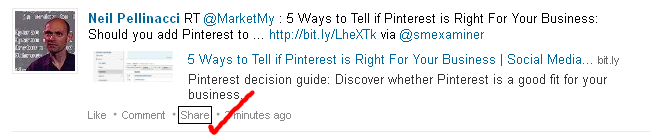
This is a problem I wrote about recently over on Social Mii so I won't cover it again in detail here, except to repeat one of the screenshots which describes the problem (click on all the images in this post to enlarge them):

The issue here is a lack of a LinkedIn "share" link when Tweets are piped directly into LinkedIn from Twitter.

The ability to schedule retweets using Buffer allows you to also share the update with other social media networks, including LinkedIn. Here's an example of the process in action.

We start with the Tweet we wish to retweet. As we have the Buffer extension installed, the twitter.com page now includes the "Buffer" link, along with the Buffer icon:


Click on the Buffer link, and the normal Buffer extension dialogue appears, with the original Tweet shown with the "RT @user:" retweet prefix. In this example, the addition of this prefix pushes the text to over 140 characters, which is too much for Twitter, so it does need to be edited down slightly.


Note that the Buffer accounts list include my Twitter and LinkedIn accounts, which means that this update will go to both social networks. Click "Add to Buffer", and the post will be added.

We now check the Buffer schedule and find both the Twitter and LinkedIn updates are in place:


One other thing to add is that the LinkedIn share allows for additional information to be displayed from any link included in the Tweet, and although Buffer supports this, it isn't included here. However, all is not lost, as we can now edit the LinkedIn item by using the "edit this post" button in Buffer. We only need to make a minor change to the text (such as adding a space) and Buffer will go off and fetch the additional information, and update the post:


So now we can effectively and quickly retweet from Twitter into other social networks, including LinkedIn, and once in LinkedIn, our updates can be easily shared by others in our network:


Wednesday, 23 May 2012

Running Competitions on Pinterest


Briers Home & Gift Web Site

Vancouver retailer Briers Home & Gift is running a competition using Pinterest, until the end of June. You can enter by pinning items from their online store catalogue on to your Pinterest board and then submitting the pin URL on the Briers web site.

What's interesting about the competition is that it has multiple streams, using a combination of random draws of pins (weekly, and at the end of the competition), a tally of re-pins and likes for each pin submitted, and the good old judges-decision-is-final who can create the coolest board on Pinterest.

The downside, perhaps, is that the entry process is a bit clunky - pinning is of course quite quick, but the form filling process afterwards is more fiddly. I'm sure there's some scope for a bookmarklet or similar time-saving tool to be created to help with this... I may have my coding hat on later in the week.

You can find out more and watch the video on the Briers web site. The competition is open to anyone, anywhere in the world, so it's worth taking a look not only to see how they're doing it, but also to take part!


Friday, 20 April 2012

Friday Round-Up

Photo credit: PhillipC on Flickr
The Friday Round-Up has moved! And improved, with the standard Twitter Javascript interface replaced by a static page - so no more waiting for it to load. But, it's still on Friday and it's a still a Round-Up of web bits, and it's here:

Tuesday, 13 March 2012

Do Conference Tweets Say More About You than the Speaker?

There are those who do... and those who Tweet...

I was at QCon in London last Friday to be on a panel session. It was fascinating to see what goes on at conferences now, having not been to one for years. Good to see Tweets in context whilst actually being at the event, rather than from afar.

Picture by NCVO

Like any such event, the talks (I managed to get to four) varied in terms of interest, presentation and engagement, depending on what you want to learn about, and the experience and skill of the presenter. What surprised me were a couple of Tweets about a talk that I attended on the data structures behind LinkedIn.

The early parts of the talk were interesting, and helped me to understand a bit more about what goes on behind the scenes when various LinkedIn events take place, such as making a new connection. After a while, it did lose its way slightly, and I found it harder to follow, probably due to a lack of understanding on my part of the finer points, and perhaps a rather flat presentation style on the part of the speaker. Frustratingly, he also hinted at some new excitement within the architecture, but didn't cover it in the talk.

Anyway, that's my opinion. Someone else's opinion expressed on Twitter was more along the lines of "hey, we've got this great new storage architecture, but I'm going to talk about Oracle instead" and another described the talk as a "snooze fest" and expressed relief that it did at least finish early.

I get the impression they didn't like it. They could have walked out (perhaps they were some of those who did in fact leave, as happened in most of the talks I attended, as people made an early decision to swap rooms) rather than stay. True, it wasn't the greatest talk but then it wasn't awful either, and for all I know, the presenter was doing it to get out of his comfort zone (as I did with the panel session) and he was at least prepared to try to share some of his knowledge. Yes, I know that people paid good money to be there and have expectations, but something else occurs to me:

If you're recruiting, who are you going to choose when you do your social media background checks - someone who's prepared to do something (the speaker) or someone who's prepared to Tweet about how bad it all is?

Wednesday, 7 March 2012

Pinterest Pin Notifications - Updated Email Format

In a previous post I set up email notifications for new pins on Pinterest using ifttt. I soon changed the default email format so that the subject line of the email told me pretty much everything I needed to know: that it was Pinterest, who pinned, and when. The change to the ifttt task to do this looks like this:


Thursday, 1 March 2012

Get Pinterest Pin Notifications with ifttt

Pinterest will notify you when others like, re-pin and comment on your pins, but there doesn't seem to be much to help you with what the people you're following are pinning. You don't really have a choice other than to check your home page on Pinterest to see what's new. Help is it hand however from a combination of something Pinterest does offer, and another rising web star, ifttt.

If you check your home page on Pinterest, you'll see the RSS feed icon under your profile. Hover your mouse over that icon and you'll see the URL for the feed. If you click on the icon, you'll see the feed in your browser. Of course, you're not alone in having this feed, other users on Pinterest have one as well, and it gets updated whenever they pin something new. If you watch this feed, you can know when the people you follow pin something. However, this could be a lot of feeds to monitor.

Ifttt stands for "If this then that" and is a rules-based processing engine for web applications. You can find out more here, but in a nutshell, it allows you to check something has happened, and if it has, perform an action.

One of the things it can check is for a change to a feed. You tell it the feed, and it checks it for changes at a regular interval. When it does change, you can give it an action to perform, such as sending you an email.

Here's how to create a task in ifttt which will send you notifications when someone pins something new on Pinterest:

Create a new task - click on "create a task" and the initial prompt screen appears:

Click on "this" to add a channel. The screen looks like this (I've selected the "Feed" channel):
Clicking on this will result in you being asked to configure the feed channel, here I've just selected a new feed item:

Now configure it with the Pinterest feed you want to monitor, for example for http://pinterest.com/npellinacci/feed.rss you would do this:
Next click on "Create trigger" to complete this step. You'll then be asked to choose the action to perform:
Click on "that" and you'll be asked to choose a channel for the action, here I've selected "Email":
Clicking on this will result in you being asked to configure the action channel, which in this case is just to send an email:
When you click on this, you'll be asked to configure the subject and body fields for your message, which will appear with some pre-populated data items from the trigger channel. For now, you can leave this as it is and click on "Create action":
Finally, a summary of your task appears, and you can add a description for it, remember to make it meaningful, and then click "Create task" to complete your work.
And you're done. Now, whenever ifttt detects a change to the feed, you'll receive an email to let you know.

Monday, 20 February 2012

International Bar Association Survey on the Impact of Social Networking on the Legal Profession

The IBA has published the results of a major survey into attitudes towards various aspects of social media. It surveyed member bar organisations around the globe, and reports the findings here. My thanks to Randy Perkins for bringing this to my attention.

Most of the findings are in fact in line with what one might expect, and indeed are similar to opinions expressed in other professions, however the following findings from the summary are of note:

Photo by James Cridland
Over 85 per cent of respondents deemed it acceptable for lawyers to access and use the information found on the online social networking profiles of the parties in a case, which forms part of the public domain, as evidence in proceedings.

73% felt it is acceptable for legal employers to consider the information found on online social networking profiles in evaluating potential work candidates.

These opinons agree with those generally held, i.e. that if you make information about yourself freely available via the web and social media, you shouldn't be surprised if someone uses it to find out more about you - for any reason.

Nearly 95 per cent of respondents from jurisdictions containing a jury system thought that, in addition to routine instructions, jurors should receive specific instructions limiting their online communications and use of online social networking sites.

There have been some high profile cases recently where jurors have used social media and other online tools inappropriately.

85 per cent of respondents thought that law students should be informed by their law schools as to the potential risks and disadvantages associated with the use of online social networking within the legal profession.

80 per cent of respondents stated that there is a need for ethical/professional codes and standards to be adapted to online social interactions affecting the legal profession and practice, as they cannot be adequately applied in their current form.

I can't help but feel that this approach will be increasingly adopted by many professions with regards to their attitudes towards social media, i.e. being a standard aspect of professional training and also forming part of professional codes of conduct.

Over 75 per cent of respondents considered the advantages of online social networking to outweigh its disadvantages.

The IBA plans to launch a follow-up project in March 2012.
 

Wednesday, 15 February 2012

Why Checking your Profile is Important

Don't let poor spelling, grammar or unexpected text truncation damage your social media presence.

"Dave and I worked together on implementing a new system, Dave on the customer tea...". This turned out to be an unfortunate summary, as Dave actually worked on the "customer team and was hugely instrumental in the success of the project".

I saw this recently on LinkedIn. We use our web sites, blogs and profiles on social media sites to promote ourselves, our businesses and the things we do. Yet the number one problem I see in all these things - poor accuracy of textual information - can be both the most damaging and the easiest to fix.

Spelling seems to be a problem, which is hugely surprising as pretty much all the content entered on the web is via a browser, and spell checking should be pretty much the norm. I'm typing this using Firefox, and anything with dubious spelling is underlined in red, as it would be if I were typing a letter in Word. So there really is no excuse for poor spelling on your LinkedIn profile, or that latest marketing Tweet.

Grammar can be dealt with similarly, but there is of course a much harder issue of using the wrong words in the wrong places - my favourites being "there" and "their" and of course "your" and "you're". You can only get round these by taking the time after you've completed your typing to review what you've entered, and make sure it's correct. If you've any doubts, or the content is really important, perhaps a new product launch page on your web site, get it proofread, either by a professional or by a colleague with a keen eye.

Reviewing your work is important for another reason, it gives you a chance to put yourself in the position of the reader and make sure that the message appears in the way that you intended. This is especially important for those sites which take long pieces of text and truncate them to create a summary, with a hyperlink to "click for more". That truncation can appear in exactly the wrong place, not only reducing the impact of the text, but sometimes reversing it completely, as in the example above.

Here are some other examples I've seen recently:

A profile of a marketing professional where the summary stressed their focus on brand management, consistency and attention to detail, before ending with "you're cup is always full".

There was also the profile written by the "apllication developer".

I also recently saw a competition web site where the names of two brand products - which were the prizes - were spelt incorrectly.

Why is this important? Well, our presence on the web shows our potential clients what we can do for them, and the precision with which we can do it. They will expect us to produce work which represents their brand and business objectives accurately and consistently. If we can't do that for our own brand, then why will they trust us with theirs?

Friday, 3 February 2012

Increasing Interest in Pinterest

Yesterday I linked to an article about using Pinterest to promote your business. This was the latest in a series of references I'd seen on social media web sites and blogs. Today there are more. When you see one person writing about a social media web site it's usually interesting in itself. When you see more than one writing about the same site, it becomes more significant. When you see more than one writing about the same site on the same day it's probably time to sit up and take notice.

Pinterest is, in its own words, "an online pinboard. Organize and share things you love." Go to the home page now. Find something interesting. Click on it. You'll see quickly how it works. The image appears, with comments, along with information about who pinned it, where they got it from (for example, I clicked on a recipe photograph and it took me to the recipe page on the author's blog), and what board it was pinned to. Other users can also "like" and "repin" to other boards.

Further Reading

For more information, read these blog posts from ViralBlog and Jeff Bullas. There are lots of statistics and research results in this post on SocialMouths.

Friday, 13 January 2012

Search Minus Your World?

There's been a lot of press, blog and Twitter coverage this week about the changes Google has made to its search offering - Search Plus Your World.

I spotted something recently on a Google search, annoying and perplexing, and which might affect the way in which I use Google search in the future. It could be that I've missed something really obvious, so someone please do let me know if I have. If I go to Google and search for "LinkedIn Updates" (as I did recently) I get a page of search results, as you might expect:


Now I might be quite pleased about this, as two of my blog posts show up on the first page of results. However, this is actually only happening because Google knows who I am. If I log out and repeat the search, my search results disappear:

Fair enough. However, why do I actually want to know that two posts on my own blog are relevant to the search query "LinkedIn Updates"? I did, after all, write them both, so it's a fair bet I know about them. My search doesn't really return 10 useful links, only 8, as I already know about the other two. Is there a limit on this - if not, I might get to a stage where half the results shown aren't news to me, which kind of defeats the object.

Looking at the Google search options, this doesn't appear related to the social search. I think. There seem to be more and more options to set up on Google these days.

Let's remember the reason why Google became so popular in the first place - it was quick, uncluttered, and allowed you to find out stuff you didn't know.

Somehow we need to get back to that. So it may be that Google Search becomes more useful when you're logged out. A kind of "Search Minus Your World".

Tuesday, 3 January 2012

Embedding Blog Posts on your Web Pages

Recently I spent some time looking at how to embed a list of blog posts obtained via a feed URL into a static web page. I wanted to do this so that I could create a static landing page for my business which included not only an overview of the services offered, but also links into some regularly updated content from multiple sources.

A search on Google took me to a couple of interesting possibilities, but most of the links were out of date, there was one which hinted at a gadget (supplied by Google unsurprisingly) but that didn't lead anywhere, and others who had tried it had similar problems.

I also found a third party web site which would create the necessary Javascript and host it for you - you simply have to link the script in from your web page. However, this wasn't really what I wanted - you have to register on the site, whereas I was looking for code, in order to experiment and extend.

Finally I found the article Displaying RSS feeds easily using Google Ajax Feed API on the JavaScript Kit web site. This article covers the following:

  • Introduction to the Google Ajax Feed API
  • Detailed look at the underlying functions
  • General purpose script for displaying feeds

This proved to be exactly what I was looking for, and being a code solution rather than a third party service, there's scope to customise as required.

Wednesday, 21 December 2011

Improving your LinkedIn Profile - Photos

Looking at my connections recently I noticed that whilst over half of them do include photos on their profiles, 40% don't have a photo, and a small number, around 2% have photos but the photos aren't of the person - they are, for example, company logos.

This got me thinking what the "conventional wisdom" might be regarding this, and so as always I went off to Google to find some articles.

I read a blog post which stated that your profile is seven times more likely to be viewed if it has a photograph, however there was, unfortunately, no obvious reference to back this up.

In a recent blog post Does My LinkedIn Profile Really Need a Photo?, Meg Guiseppi reminds us that we are creating a brand with our LinkedIn profiles, and that "branding is also about creating emotional connections", and goes on to list some excellent reasons why you should have a photo on your profile.

As to what type of photo you should have, there are several approaches, the most obvious being the "professional" option, as outlined in these blog posts by Jean Cummings and Nick Gilham. However, I'm not sure it's so clear cut, here are my own thoughts:
  • Do have a photo. Remember why you're building up your profile on LinkedIn.
  • Do make sure you're in the photo, don't use a company logo or some other artwork, and make sure that it is obviously you.
  • Don't use your passport photograph. The only time you look like that is when you go through immigration checks at an airport.
  • Don't take the photograph yourself with your phone. It shows. Really.
  • Don't have other people in the photo. This really is all about you.
  • Don't appear unprofessional, for example, being drunk at a party or stuffing your face with food.
Consider using the photo to communicate something about yourself which is not covered by the main part of your profile. My profile photo tells you something about the sort of person I am, which isn't covered in the main part of the profile.

Use a professional photographer if you feel that will convey the message you are aiming for. However, I have two observations on this:
  • Jaunty angles are typically the preserve of celebrities, so avoid them. Unless you are of course a celebrity.
  • There is a chance of looking like everyone else in an environment where you are aiming to stand out from the rest.

Friday, 9 December 2011

Get More from LinkedIn Updates - Part 2

In part 1 I looked at some of the ways you can improve your use of LinkedIn updates, particularly feeding in updates from Twitter. You can also post updates directly in LinkedIn, using the "Share an update" dialogue at the top of the screen.

This useful dialogue allows you to attach a link to an external article, such as a blog post, either by clicking on "Attach a link" and pasting the link into the box which appears, or directly - paste the link into the share dialogue, and watch everything update. You can also provide additional text in the share dialogue.

If you are feeding updates from Twitter into LinkedIn, there is a pitfall to avoid however, which is posting the same update twice, once via Twitter and then separately via the direct LinkedIn update. Your connections on LinkedIn will see two updates, identical, often next to each other, like this (admittedly rather contrived) example:

This can becoming annoying very quickly, and could lead to your updates being hidden by others, something which you obviously want to avoid.